 Redrafty
Project file · index
Index for project file — format and samples.
The index lists every part of your project with its page number. Copy a sample table below — or let Word fill in the page numbers for you: the steps are further down.
- Free to copy
- Real pages, not mock-ups
- Class 11, 12 & college
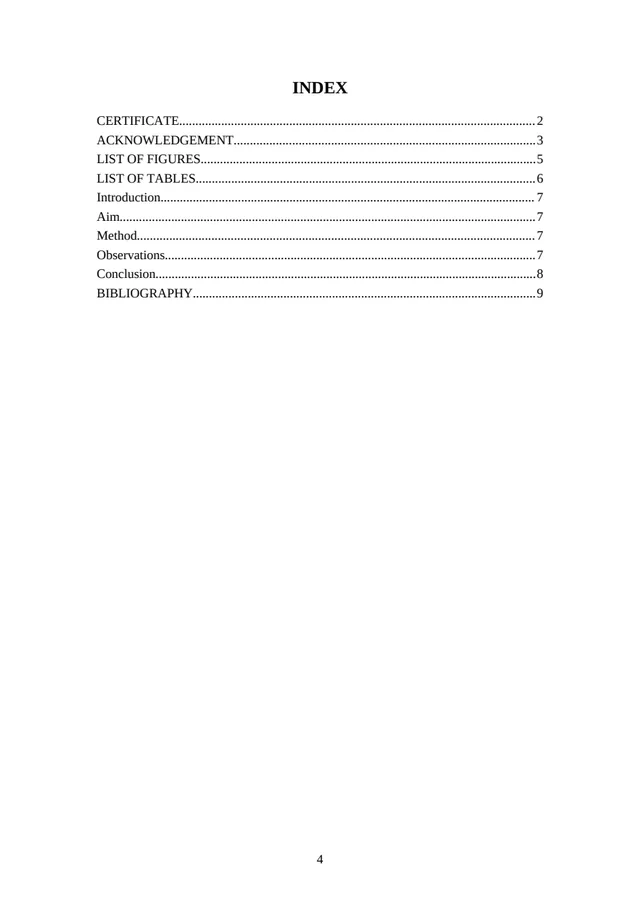
What goes in the index.
- The heading — INDEX (or CONTENTS), centred at the top.
- Every part after the front page: the certificate, the acknowledgement, each section of your project and the bibliography.
- A page number for each — in its own column, or after a row of dots.
- Number your pages first, then fill in the index — or let Word fill it in.
Practical files often add a column for the date or the teacher’s signature — follow your teacher.
6 index samples.
Copy it, fill in the [brackets], make it yours.
School project
| S.No. | Topic | Page No. |
|---|---|---|
| 1 | Certificate | 2 |
| 2 | Acknowledgement | 3 |
| 3 | Introduction | 4 |
| 4 | Aim | 5 |
| 5 | [Main part — e.g. Method or Survey] | 6 |
| 6 | Observations | 8 |
| 7 | Conclusion | 10 |
| 8 | Bibliography | 11 |
Physics or Chemistry investigatory project
| S.No. | Topic | Page No. |
|---|---|---|
| 1 | Certificate | 2 |
| 2 | Acknowledgement | 3 |
| 3 | Aim | 4 |
| 4 | Introduction | 5 |
| 5 | Theory | 6 |
| 6 | Apparatus required | 8 |
| 7 | Procedure | 9 |
| 8 | Observations | 10 |
| 9 | Result | 12 |
| 10 | Precautions | 13 |
| 11 | Bibliography | 14 |
English project
| S.No. | Topic | Page No. |
|---|---|---|
| 1 | Certificate | 2 |
| 2 | Acknowledgement | 3 |
| 3 | Introduction | 4 |
| 4 | About the [author / poet] | 5 |
| 5 | Summary of “[chapter or poem]” | 6 |
| 6 | Themes | 8 |
| 7 | [Your activity — e.g. Interview or Survey] | 9 |
| 8 | My views | 11 |
| 9 | Conclusion | 12 |
| 10 | Bibliography | 13 |
Commerce project — Accountancy, Business Studies
| S.No. | Topic | Page No. |
|---|---|---|
| 1 | Certificate | 2 |
| 2 | Acknowledgement | 3 |
| 3 | Introduction | 4 |
| 4 | Objectives | 5 |
| 5 | [About the company or topic] | 6 |
| 6 | Data and analysis | 8 |
| 7 | Findings and suggestions | 12 |
| 8 | Conclusion | 13 |
| 9 | Bibliography | 14 |
Practical file — with date and signature
| S.No. | Experiment | Date | Page No. | Teacher’s sign |
|---|---|---|---|---|
| 1 | [Experiment 1] | 1 | ||
| 2 | [Experiment 2] | 4 | ||
| 3 | [Experiment 3] | 7 | ||
| 4 | [Experiment 4] | 10 |
College project report — table of contents
TABLE OF CONTENTS
CERTIFICATE .......... ii
DECLARATION .......... iii
ACKNOWLEDGEMENT .......... iv
ABSTRACT .......... v
LIST OF FIGURES .......... vii
LIST OF TABLES .......... vii
CHAPTER 1 INTRODUCTION .......... 1
CHAPTER 2 LITERATURE REVIEW .......... [3]
CHAPTER 3 [Your chapter title] .......... [7]
CHAPTER 4 [Your chapter title] .......... [12]
CHAPTER 5 RESULTS AND DISCUSSION .......... [18]
CHAPTER 6 CONCLUSION .......... [24]
REFERENCES .......... [26]
Change the page numbers to match your file. Pasted a table into Word as text? Select it and use .
Let Word fill in the page numbers.
- Give each section title a heading style: select it, then .
- Put the cursor on the index page and choose . Word lists every heading with its page number.
- Change the title “Contents” to INDEX if your school calls it that.
- Changed something? Right-click the index, then — the page numbers follow.
On your phone, or tired of fixing page numbers? Send your draft to Redrafty — the index comes back with the page numbers already filled in.
How the finished page looks.
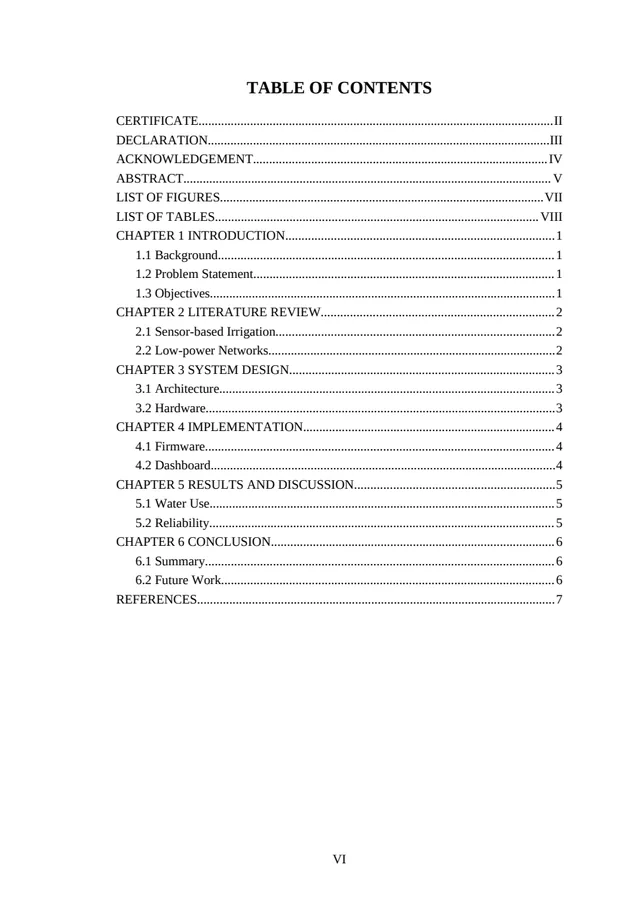
Pages from real builds of our own sample drafts in Redrafty, unedited. The schools and names are placeholders. Tap a page to see it larger.
The pages of a project file, in order.
The usual order — if your teacher asks for a different one, follow your teacher.
Do this. Skip that.
Do
- List every part after the front page
- Use the same titles as in the project
- Check every page number before you print
- Keep it to one page if you can
Don’t
- Write the index before the pages are numbered
- Number the front page if your teacher doesn’t want it
- Leave out the bibliography
- Mix two styles — table or dotted lines, pick one
Don’t want to type it all?
Send your project draft to Redrafty in Telegram — it makes the front page, certificate, acknowledgement and index from your details, with the page numbers filled in, and sends back Word and PDF. See the first pages free.
Build my project file →No subscription. Pay only when you need it. How it works · Check a finished file’s format free
Questions? Answers.
Index or table of contents — what’s the difference?
Do the certificate and acknowledgement go in the index?
Why are the page numbers in my Word index wrong?
What does “Error! Bookmark not defined” mean?
Can I write the index by hand?
The rest of your project file.
Your front pages, filled in from your draft.
See the first pages free. Word and PDF, right in Telegram.
Build my project file in TelegramNo subscription. Pay only when you need it.